

What you’ll build:
- A Telegram bot that responds to messages via webhook
- Secure per-user credential storage in MongoDB
- AI-powered natural language processing for trading commands
- Dynamic Binance integration using stored credentials
- Account balance checking and price history tools
Import & Run
Get started immediately by importing the complete workflow:1
Download the Configuration
Download the workflow from the ServFlow Cookbook
2
Import into ServFlow
In the ServFlow dashboard, click Import in the Files panel and select the downloaded YAML file
3
Configure Integrations
Set up the required integrations:
- mongo-main — MongoDB for storing user credentials
- open-ai-main — OpenAI for the AI agent
4
Add Your Bot Token
Go to Settings → Secrets and add:
5
Set the Telegram Webhook
Tell Telegram where to send messages:
6
Test Your Bot
Open your bot in Telegram and try:
/save_creds your_api_key your_secret_key— Save Binance credentials- “What’s my account balance?” — Check your balance
- “Show me BTC price history for the last 12 hours” — Get price data
How It Works
The rest of this guide explains how the imported workflow is structured and what each component does.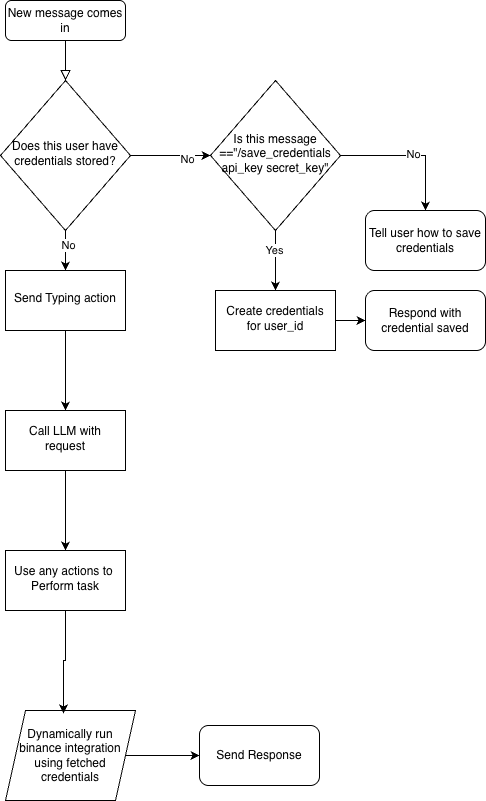
- New message arrives → Check if user has stored Binance credentials
- If credentials exist → Send typing indicator → Process with AI agent → Send response
- If no credentials → Check if message is a
/save_credscommand - If save command → Store credentials → Confirm to user
- If not save command → Tell user how to save credentials
Workflow Entry Point
The workflow listens for Telegram webhook requests via an HTTP POST endpoint.Telegram sends webhook payloads as JSON containing message details. The key fields are
message.chat.id, message.from.id, and message.text.Telegram Field Presets
Throughout this workflow, you’ll see references to Telegram message data. ServFlow automatically detects Telegram webhooks and provides convenient presets in the content editor. When editing any field, open the content editor and expand Popular Variables → Telegram: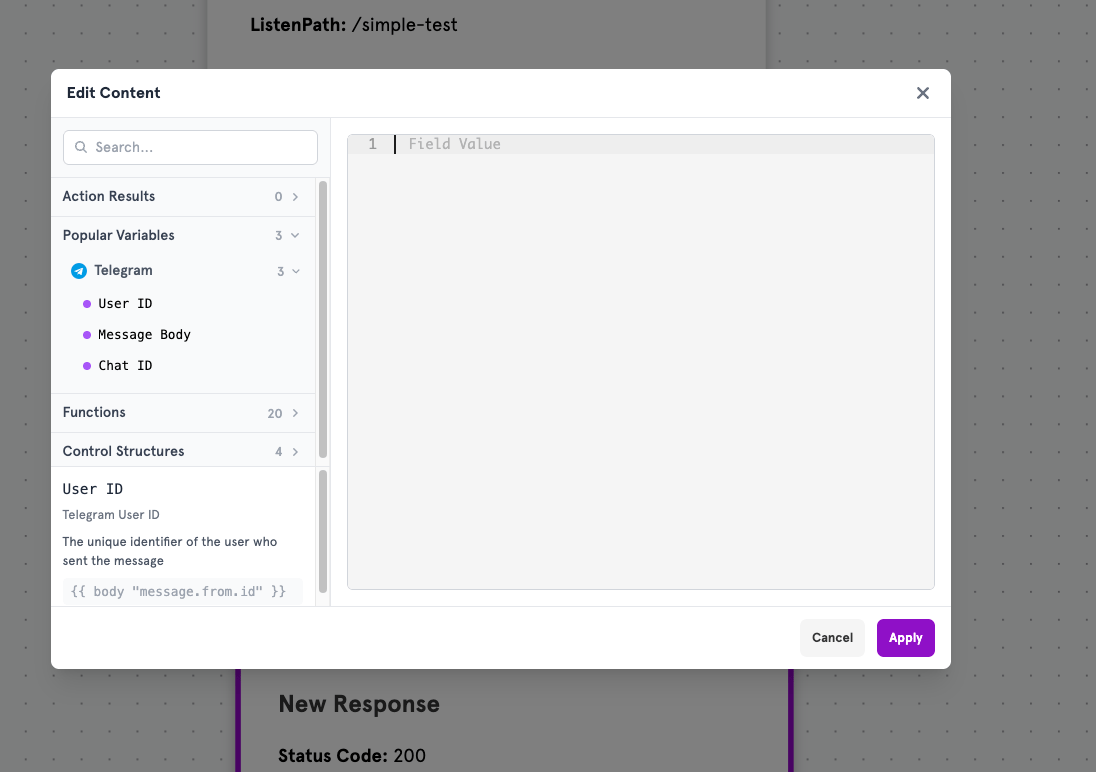
Click any preset to insert it automatically — no need to memorize the syntax!
Action: Fetch Credentials
Type:fetch
This action checks if the user has already stored their Binance API credentials in the database.
Filter Configuration
Routing
Action: Parse Command
Type:javascript
When a user doesn’t have credentials, this action parses the incoming message to check if they’re sending a /save_creds command.
Script Logic
Output
Conditional: Is Save Credentials
Type:conditional
Checks if the parsed command is /save_creds.
Routing
Action: Save Credentials
Type:store
Stores the user’s Binance API credentials in MongoDB.
Fields Stored
Action: Credentials Saved (HTTP)
Type:http
Sends a confirmation message to the user via Telegram.
Request Body
Action: Add Credentials (HTTP)
Type:http
Tells users without credentials how to save them.
Request Body
Action: Is Typing (HTTP)
Type:http
Sends a “typing” indicator so users know the bot is processing their request.
Action: Agent LLM
Type:agent
The AI agent that understands natural language and decides which tools to use.
System Prompt
User Prompt
Message Body preset — the actual message text from the user.Tool: Price Difference
Allows the agent to fetch price history data.Tool: Account Balance
Allows the agent to check the user’s Binance balance.Action: Binance Price Difference
Type:binance/pricedifference
Called by the agent’s price_difference tool.
The
tool_param function accesses parameters passed by the AI agent when it calls this tool.Action: Fetch Account Balance
Type:binance/accountbalance
Called by the agent’s account_balance tool.
Action: Telegram Reply (HTTP)
Type:http
Sends the AI agent’s response back to the user.
Request Body
Dynamic Binance Integration
The key to supporting multiple users is the lazy-loaded integration that uses each user’s stored credentials.Dynamic Credentials
Lazy Load means the integration initializes only when an action uses it. At that point, the credentials from the
fetch_credentials action are available, allowing each user’s Binance operations to use their own stored API keys.Response Definitions
Success Response
Error Response
Testing
Use ServFlow’s test mode to simulate requests without setting up the Telegram webhook.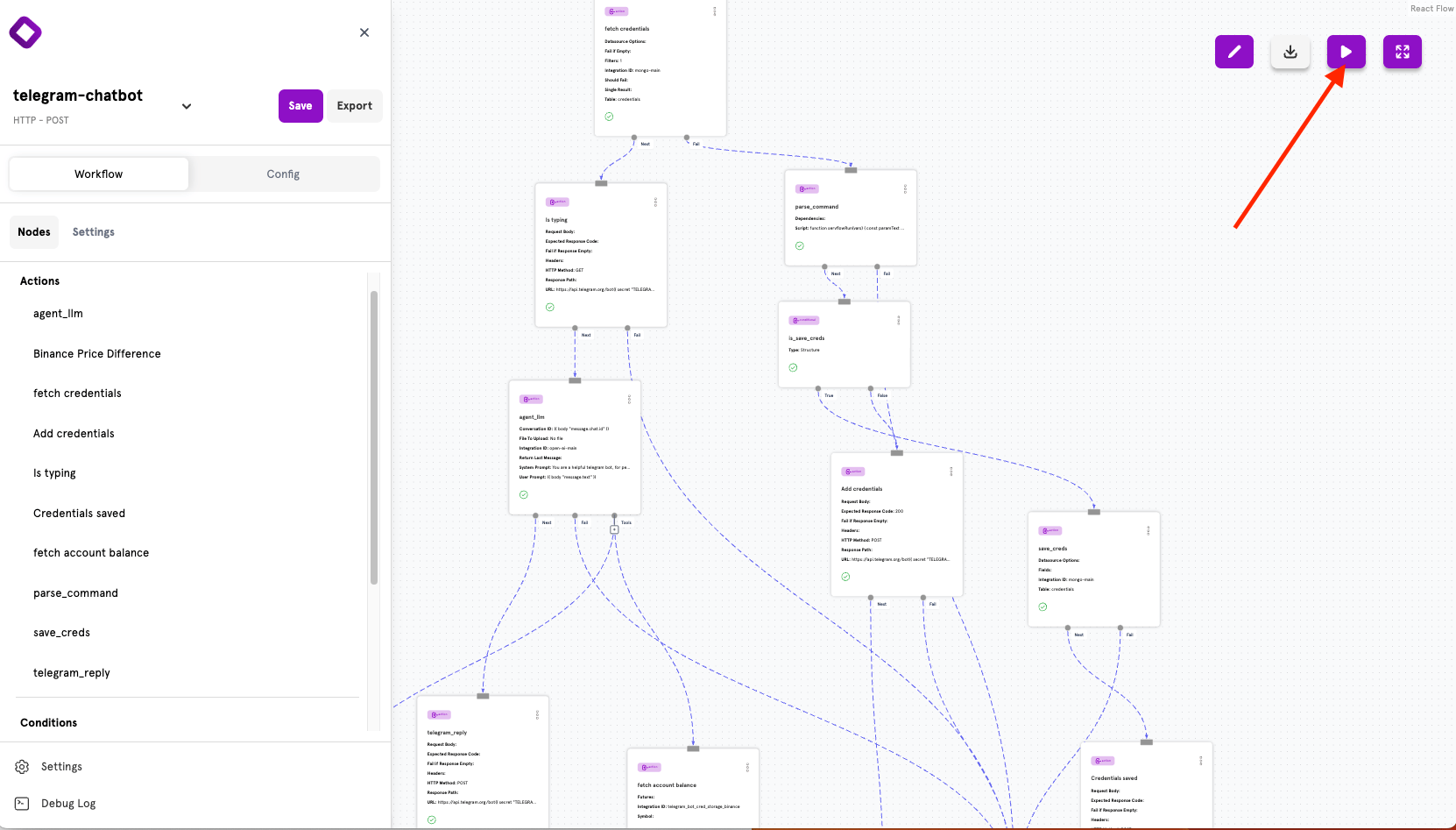
Security Considerations
Extending the Bot
Now that you understand how the bot works, consider adding:- More Binance tools — Spot/futures trading, order management
- Price alerts — Scheduled checks that notify users of price movements
- Trade logging — Store trades to MongoDB for user history
- Multi-exchange support — Add integrations for other exchanges
Next Steps
AI Agents
Learn more about configuring AI agents and tools.
Binance Trading
Explore all available Binance actions.
Data Operations
Master MongoDB and database operations.
Secrets Management
Securely manage API tokens and credentials.